AWS Hybrid DNS Resolution
Many AWS customers struggle to set up networking and DNS resolution in a multi-account AWS environment. A solid networking and DNS foundation is essential if your environment is to scale efficiently while keeping operating costs low and maintaining a strong security posture.
In this post, we focus on different strategies for setting up hybrid DNS resolution with AWS Route53 Resolver endpoints. At AWS re:Invent 2019, AWS presented a deep dive session covering several approaches to hybrid DNS resolution in enterprise environments. The solutions below are similar to solutions 1, 2 and 4 from that session.
Nomenclature
- Hub AWS account – AWS account used as the central hub for DNS resolution. In all diagrams, this account is depicted as “org-core-network”.
- Hub VPC – VPC which reside in hub AWS account.
- Spoke AWS account – all AWS accounts that are not the hub AWS account.
- Spoke VPC – VPC which reside in a spoke AWS account.
Assumptions
- You have access to the hub AWS account and all spoke AWS accounts, with sufficient IAM permissions to carry out the tasks below.
- Connectivity between the hub VPC and spoke VPCs is in place via AWS Transit Gateway (preferable) or AWS VPC peering connections.
- Connectivity between the hub VPC and on-premise networks is in place via AWS Direct Connect and/or AWS Site-to-Site VPN.
Which network flows need to be allowed by security groups, network ACLs and firewalls differs between the solutions, so it is listed under each solution below.
Note on network ACLs: Network ACLs are stateless, so every DNS flow needs two rules: one allowing port 53 towards the DNS server, and one allowing the return traffic on the ephemeral port range (1024-65535) in the opposite direction. Always allow both TCP and UDP for port 53, as DNS falls back to TCP for large responses.
Solution 1
Design Overview
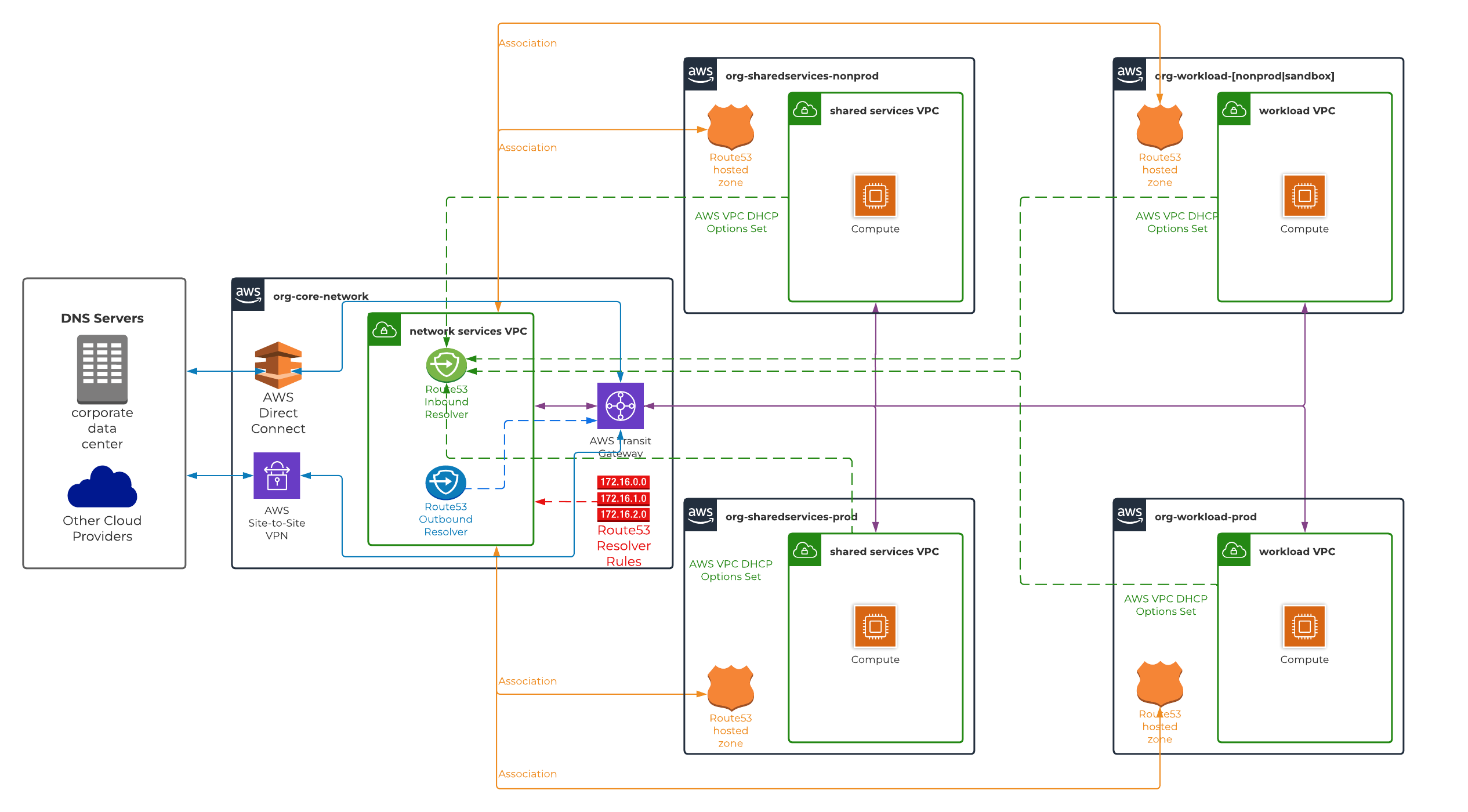
Solution 1 is a fully centralised model where every spoke VPC sends all of its DNS queries directly to the AWS Route53 inbound resolver endpoint in the hub VPC.
This is achieved by setting the domain name servers property of each spoke VPC’s DHCP options set to the IP addresses of the inbound resolver endpoint interfaces. Instances in the spoke VPCs therefore send their DNS queries across the Transit Gateway (or VPC peering connection) to the hub VPC, instead of to their own VPC DNS resolver (VPC DNS IP).
The inbound resolver endpoint resolves these queries using the hub VPC’s DNS resolver, so:
- AWS Route53 private hosted zones in the spoke accounts are associated with the hub VPC.
- Resolver rules that forward queries for on-premise corporate domains to the on-premise DNS servers (via the outbound resolver endpoint) are created in the hub account and associated ONLY with the hub VPC.
Because spoke VPCs no longer use their own VPC DNS resolver, names that only the spoke VPC’s own resolver can answer (e.g. the spoke’s EC2 private DNS hostnames, or private DNS names of interface endpoints deployed in the spoke VPC) are not resolvable from the spoke, unless they are also made available to the hub VPC.
 Network Requirements
| Flow | Source | Destination | Required |
|---|---|---|---|
| Spoke DNS queries | Spoke VPCs | Inbound resolver endpoint interfaces (TCP/UDP 53) | Yes |
| Forwarding to on-premise | Outbound resolver endpoint interfaces | On-premise DNS servers (TCP/UDP 53) | Yes |
| On-premise queries for AWS hosted domains | On-premise DNS servers | Inbound resolver endpoint interfaces (TCP/UDP 53) | Only if on-premise needs to resolve AWS hosted domains |
This means:
- The inbound resolver endpoint security group must allow TCP/UDP port 53 from all spoke VPC CIDRs (and from the on-premise DNS servers, if applicable).
- The network ACLs of the hub VPC subnets hosting the resolver endpoints must allow inbound TCP/UDP port 53 from all spoke VPC CIDRs, and outbound ephemeral ports back to them. The spoke VPC network ACLs need the mirror image of these rules.
- The outbound resolver endpoint security group and the hub VPC network ACLs must allow outbound TCP/UDP port 53 to the on-premise DNS servers, with inbound ephemeral ports for the responses.
- Any firewall in the path between the spoke VPCs and the hub VPC (e.g. AWS Network Firewall) must allow DNS traffic to the inbound resolver endpoint interfaces.
- Access to hub and all spoke AWS accounts with sufficient IAM permissions to execute necessary tasks/commands.
- Network connectivity between hub VPC and all spoke VPCs either via AWS Transit Gateway (preferable) or AWS VPC peering connection. Please ensure VPC Network ACLs are configured to allow TCP/UDP port 53 from all spoke VPCs to hub VPC Route53 resolver endpoint interfaces.
- Network connectivity between hub VPC and on-premise network either via AWS Direct Connect and/or site-to-site VPN connection. Please ensure VPC Network ACL in hub VPC is configured to allow inbound & outbound TCP/UDP port 53 from & to on-premise network IP CIDR respectively for bi-directional DNS resolution.
Implementation
- Associate the AWS Route53 private hosted zones in all spoke AWS accounts that require DNS resolution with the hub VPC. There is no CloudFormation support for associating a Route53 hosted zone with a VPC in another AWS account, so this needs to be done with the AWS CLI and/or SDK. Refer to the AWS Route53 documentation on authorising and associating a private hosted zone with a VPC in a different AWS account.
- Provision the AWS Route53 inbound and outbound resolver endpoints in the hub VPC. For high availability, it is recommended to create a resolver endpoint interface in every availability zone, each with a pre-determined IP address.
- Create resolver rule(s) in the hub AWS account:
- Create a forwarding rule for the on-premise domain(s), targeting the on-premise DNS server IP addresses, with the resolver endpoint ID set to the outbound resolver endpoint.
- Associate the resolver rule(s) created in step 3 with the hub VPC only.
- Create a DHCP options set in each spoke VPC, with the `domain name servers` set to the inbound resolver endpoint interface IP addresses provisioned in step 2, and associate it with the spoke VPC.
- Configure the security groups, network ACLs and firewalls as per the network requirements above.
Solution 2
Design Overview
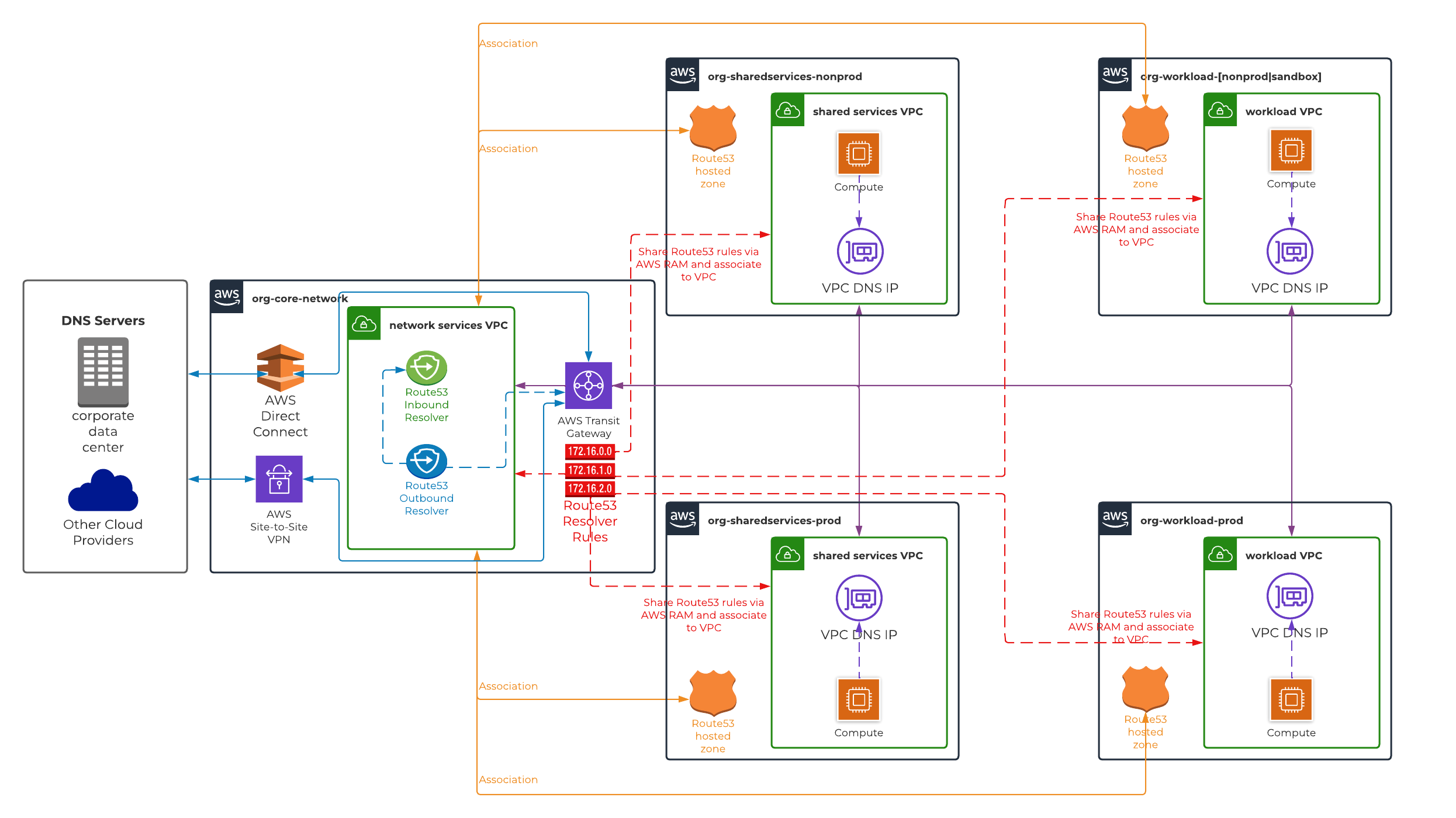
Solution 2 is also a centralised model, with the inbound and outbound resolver endpoints provisioned in the hub VPC. However, unlike Solution 1, spoke VPCs keep using their own VPC DNS resolver (VPC DNS IP) for all DNS queries, and only queries for on-premise corporate domains and/or AWS Route53 private hosted zones are forwarded to the resolver endpoints.
This is achieved by creating resolver rules in the hub AWS account, sharing them with the spoke AWS accounts via AWS Resource Access Manager (RAM), and associating them with the spoke VPCs. When an instance in a spoke VPC queries a name that matches one of these resolver rules, the spoke VPC’s own DNS resolver forwards the query on its behalf, from the outbound resolver endpoint interfaces in the hub VPC, to the target IP addresses of the rule:
- Queries for on-premise domains are forwarded from the outbound resolver endpoint to the on-premise DNS servers.
- Queries for AWS Route53 private hosted zones are forwarded from the outbound resolver endpoint to the inbound resolver endpoint, which resolves them using the private hosted zones associated with the hub VPC.
Every other DNS query is resolved by the spoke VPC’s own DNS resolver.
A common misconception: Even though the resolver rules reference the outbound resolver endpoint, instances in the spoke VPCs never send DNS traffic to the resolver endpoint interfaces. They only ever query their own VPC DNS IP, and the forwarding happens from the outbound resolver endpoint interfaces in the hub VPC. The resolver endpoint ID on a resolver rule defines where the forwarded query is sent from, not where clients send their queries to. As a result, no security group, network ACL or firewall rules are required to allow DNS traffic from the spoke VPCs to the hub VPC. Also note that outbound resolver endpoints do not accept DNS queries.
Network Requirements
| Flow | Source | Destination | Required |
|---|---|---|---|
| Spoke DNS queries | Spoke VPCs | Resolver endpoint interfaces | No - spoke VPCs only query their own VPC DNS IP |
| Forwarding of private hosted zone queries | Outbound resolver endpoint interfaces | Inbound resolver endpoint interfaces (TCP/UDP 53) | Yes - both are in the hub VPC |
| Forwarding to on-premise | Outbound resolver endpoint interface | On-premise DNS servers (TCP/UDP 53) | Yes |
| On-premise queries for AWS hosted domains | On-premise DNS servers | Inbound resolver endpoint interfaces (TCP/UDP 53) | Only if on-premise needs to resolve AWS hosted domains |
This means:
- The inbound resolver endpoint security group must allow TCP/UDP port 53 from the outbound resolver endpoint interfaces (e.g. the CIDRs of the hub VPC subnets hosting the resolver endpoints), and from the on-premise DNS servers if applicable. It does not need to allow the spoke VPC CIDRs.
- Network ACLs are evaluated for traffic between subnets in the same VPC. If the resolver endpoint interfaces are spread across multiple subnets (e.g. one per availability zone), the hub VPC network ACLs must allow TCP/UDP port 53 and ephemeral ports between those subnets.
- The outbound resolver endpoint security group and the hub VPC network ACLs must allow outbound TCP/UDP port 53 to the on-premise DNS servers, with inbound ephemeral ports for the responses.
- No changes are required to the spoke VPC network ACLs, or to any firewalls in the path between the spoke VPCs and the hub VPC, for DNS resolution.
Implementation
- Associate the AWS Route53 private hosted zones in all spoke AWS accounts that require DNS resolution with the hub VPC. There is no CloudFormation support for associating a Route53 hosted zone with a VPC in another AWS account, so this needs to be done with the AWS CLI and/or SDK. Refer to the AWS Route53 documentation on authorising and associating a private hosted zone with a VPC in a different AWS account.
- Provision the AWS Route53 inbound and outbound resolver endpoints in the hub VPC. For high availability, it is recommended to create a resolver endpoint interface in every availability zone, each with a pre-determined IP address.
- Create resolver rule(s) in the hub AWS account:
- Create a forwarding rule for the on-premise domain(s), targeting the on-premise DNS server IP addresses, with the resolver endpoint ID set to the outbound resolver endpoint.
- Create a forwarding rule for the domain(s) hosted in AWS Route53 private hosted zones, targeting the inbound resolver endpoint interface IP addresses provisioned in step 2, with the resolver endpoint ID set to the outbound resolver endpoint.
- Share the resolver rule(s) created in step 3 with all spoke AWS accounts that require DNS resolution, using AWS RAM.
- Associate the resolver rule(s) with the VPCs that require DNS resolution:
- Associate the on-premise domain forwarding rule(s) with all spoke VPCs and the hub VPC.
- Associate the private hosted zone forwarding rule(s) with all spoke VPCs, but NOT with the hub VPC. The inbound resolver endpoint resolves queries using the hub VPC’s DNS resolver. If the rule is also associated with the hub VPC, queries arriving at the inbound resolver endpoint are forwarded to the outbound resolver endpoint again, creating a DNS resolution loop. The hub VPC resolves these domains via its private hosted zone associations instead.
- Configure the security groups and network ACLs as per the network requirements above.
Solution 3
Design Overview
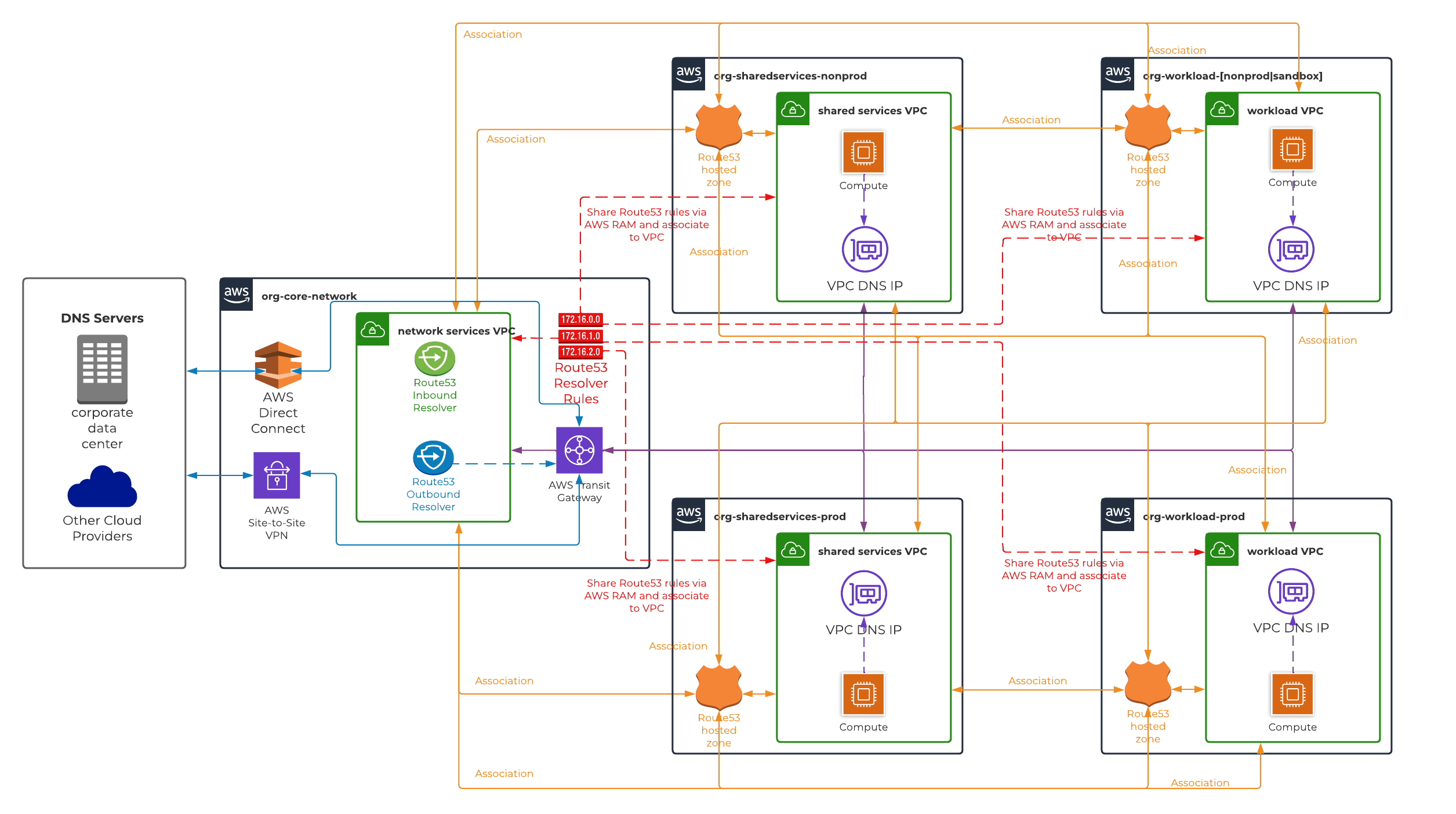
The final solution is a bit more complex in comparison to the previous two solutions. It is a decentralised model, where each AWS Route53 private hosted zone is associated directly with every VPC that needs to resolve it. This makes it the most cost-effective solution, but it requires considerable administrative overhead to set up and maintain.
Spoke VPCs use their own VPC DNS resolver (VPC DNS IP) for all DNS queries, and resolve private hosted zones through their direct associations, without any resolver endpoints involved.
The inbound and outbound resolver endpoints are still provisioned in the hub VPC, but only for hybrid DNS resolution:
- The outbound resolver endpoint forwards queries for on-premise domains to the on-premise DNS servers. The forwarding rules are created in the hub AWS account, shared with the spoke AWS accounts via AWS RAM, and associated with all VPCs, including the hub VPC. As with Solution 2, these queries are forwarded from the outbound resolver endpoint interfaces, not from the spoke VPCs.
- The inbound resolver endpoint answers queries from the on-premise DNS servers for AWS hosted domains. For this, the private hosted zones that on-premise needs to resolve must also be associated with the hub VPC.
Network Requirements
| Flow | Source | Destination | Required |
|---|---|---|---|
| Spoke DNS queries | Spoke VPCs | Resolver endpoint interfaces | No - spoke VPCs only query their own VPC DNS IP |
| Forwarding to on-premise | Outbound resolver endpoint interface | On-premise DNS servers (TCP/UDP 53) | Yes |
| On-premise queries for AWS hosted domains | On-premise DNS servers | Inbound resolver endpoint interfaces (TCP/UDP 53) | Only if on-premise needs to resolve AWS hosted domains |
This means:
- The inbound resolver endpoint security group only needs to allow TCP/UDP port 53 from the on-premise DNS servers.
- The outbound resolver endpoint security group and the hub VPC network ACLs must allow outbound TCP/UDP port 53 to the on-premise DNS servers, with inbound ephemeral ports for the responses.
- No changes are required to the spoke VPC network ACLs, or to any firewalls in the path between the spoke VPCs and the hub VPC, for DNS resolution.
Implementation
- Associate each AWS Route53 private hosted zone with every VPC that requires DNS resolution, and repeat for each private hosted zone. This includes the hub VPC for the private hosted zones that on-premise needs to resolve. There is no CloudFormation support for associating a Route53 hosted zone with a VPC in another AWS account, so this needs to be done with the AWS CLI and/or SDK. Refer to the AWS Route53 documentation on authorising and associating a private hosted zone with a VPC in a different AWS account.
- Provision the AWS Route53 inbound and outbound resolver endpoints in the hub VPC. For high availability, it is recommended to create a resolver endpoint interface in every availability zone, each with a pre-determined IP address.
- Create resolver rule(s) in the hub AWS account:
- Create a forwarding rule for the on-premise domain(s), targeting the on-premise DNS server IP addresses, with the resolver endpoint ID set to the outbound resolver endpoint.
- Share the resolver rule(s) created in step 3 with all spoke AWS accounts that require DNS resolution, using AWS RAM.
- Associate the shared resolver rule(s) with all VPCs that require DNS resolution, including the hub VPC.
- Configure the security groups and network ACLs as per the network requirements above.
Update: Since this post was first published, AWS released Route 53 Profiles, which let you group private hosted zone associations and resolver rules into a single profile, share it across AWS accounts via AWS RAM and associate it with many VPCs. This significantly reduces the administrative overhead of Solution 3, and is worth evaluating before choosing between the solutions above.
Comparison
Although implementation steps look identical in all solutions, there are key differences between them. As mentioned above, AWS re:Invent 2019 deep dive session covers pros and cons about each solution in detail. However, our comparison focuses on metrics such as cost, ease of setup/maintenance and resiliency/availability.
| # | Cost | Difficulty of Setup / Maintenance | Resiliency / Availability of Services |
|---|---|---|---|
| Solution 1 | High | Low | Low |
| Solution 2 | Low - Medium | Low - Medium | Medium - High |
| Solution 3 | Low | High | High |
Conclusion
Solution 1 is the simplest to set up and manage, but it has the highest operating cost. Every DNS query from every VPC goes to the AWS Route53 resolver endpoints, so the endpoint interfaces become a bottleneck. In high-traffic scenarios they can reach their query limits, and DNS resolution fails for the workloads that depend on them.
Solution 3 was presented as best practice in the AWS re:Invent 2019 deep dive session. However, it is cumbersome to set up and maintain, and resources can easily become misconfigured over time. A mature automation framework is essential to keep the environment stable. Even then, in an AWS organisation with private hosted zones spread across hundreds of AWS accounts, this approach quickly becomes very difficult to manage. AWS Route 53 Profiles now reduce much of this overhead and are worth considering if you choose this approach.
Solution 2 is easier to set up and manage than Solution 3, because it uses the same centralised approach as Solution 1. Only queries for domains hosted on on-premise DNS servers or in AWS Route53 private hosted zones are forwarded through the resolver endpoints. All other queries are resolved by each VPC’s own DNS resolver, which keeps the operating cost low-to-medium. For the same reason, the risk of reaching the endpoint query limits stays low-to-medium, even in high-traffic scenarios.
For these reasons, Solution 2 is our recommended solution and our go-to approach for most implementations.
If you require a fully automated framework which includes complete customisation for implementing either solution mentioned above, please check out our AWS Foundations service offering.